How to Access My Bard Account Information
By accessing your Bard on the Beach account online you can view and update your contact information, view your Pack purchases, as well as your ticket purchase history.
To view your account, follow the following steps:
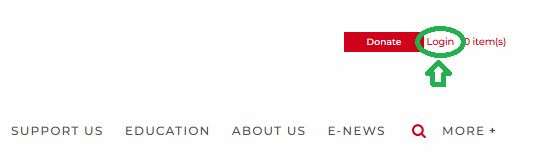
1. At the top right corner of bardonthebeach.org, click Login
2. Enter the email and password associated with your Bard on the Beach account
-
- New customer? Create an account!
- Forgot your password? You can reset it!
- Still having issues? Contact the Box Office for more support
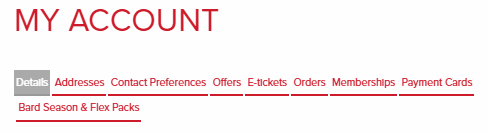
3. Once logged in, you will be directed to the My Account page with a variety of navigable information
-
-
- DETAILS: Your personal information (Name, Email, Phone Number, and Date of Birth)
- ADDRESSES: Update your billing and mailing addresses
- CONTACT PREFERENCES: Specify the ways that Bard on the Beach is permitted to contact you
- OFFERS: Any applicable offers associated with your customer account
- E-TICKETS: View and download tickets that you have purchased
- ORDERS: View your full Order History
- MEMBERSHIPS: View your active Bard on the Beach Memberships
- PAYMENT CARDS: Add or remove Mastercard or VISA cards from your account
- BARD SEASON AND FLEX PACKS: View any Flex or Season Packs that you have purchased
-